
Online Ballet Classes
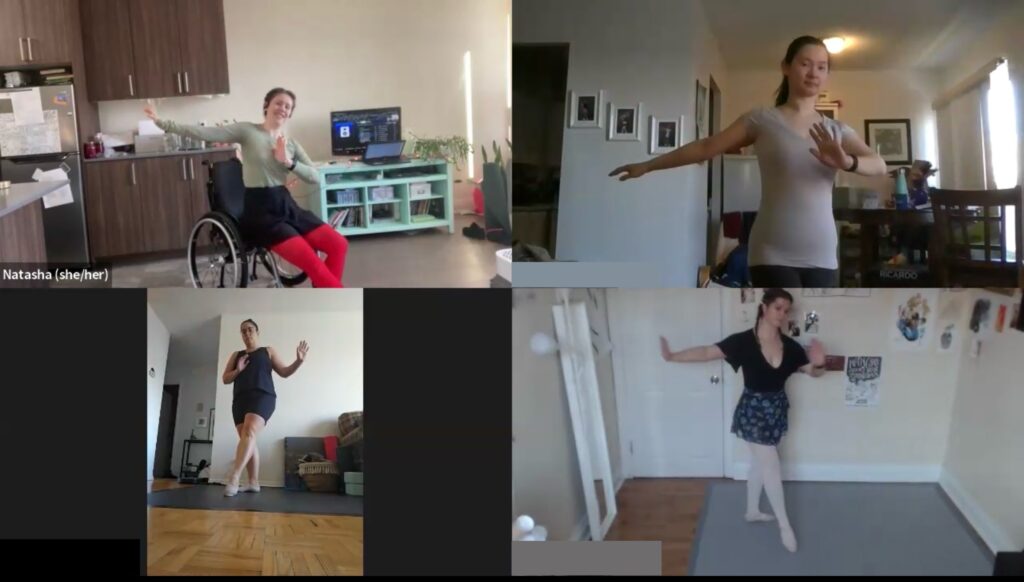
Online ballet classes focused on moving well and making artistic choices. Adaptive options meet you where you’re at and respect the pace your brain & body need.
Beginner Ballet
Unpack how ballet feels in your body, and use kinaesthetic and expressive tools to explore what you can achieve within this beautiful art form.
I’ll be teaching from my wheelchair—standing to demonstrate live as my health allows, and supplementing with pre-filmed videos. You’ll get:
- Live Zoom classes Thursday evenings from 6:00-7:00pm ET.
- Seated and standing adaptations for each exercise.
Monthly class pack holders also get:
- Class recordings so you can catch up if you miss one or enjoy repeat sessions.
- Access to the demonstrations playlist for a detailed look at every exercise.
Monthly Class Pack (September 10-October 1)
Single Class Drop-in
Express Your Interest!
Click here to view additional offerings and let me know if you’d like these classes to run.
“Natasha is kind, grounded, and present in her teaching style. She always has personalized adaptations and modifications in her pocket to help each participant feel included and able to fully participate in her classes.” –Christina
Frequently Asked Questions:
How do I pay?
Payment is by Interac e-transfer. Keep an eye on your inbox (and junk folder) for the details once you’ve signed up.
If you’d like me to add a different method of payment, leave me a note in the “accommodations” section of the sign up form and I’ll get it set up!
Do I need special shoes, clothing, or equipment?
Please wear clothes that are comfy to move in. If you’d like to get postural corrections, it’s easier for me to give them if you’re in relatively form fitting clothing and a well-lit space.
Canvas or leather soft ballet shoes work great for online ballet class, or you can also wear bare feet or socks — just make sure they’re not too slippery.
You can use a countertop or the back of a chair as a makeshift barre. It should be at least as high as your bottom ribs, and no higher than your armpit.
The classes are held on Zoom, so you’ll need a computer, phone, or tablet to connect. If you’d like to get postural and technique corrections, please set up your camera to show as much of the length of your body as possible.
What kind of flooring is best?
Smooth, firm floors like wood, tile, or rolled vinyl are safest and most practical for taking class at home. Most kitchen floors work great. Please avoid carpet if you can help it. Read more about healthy dancing on almost any floor.
Of course, if you have a home studio with sprung flooring and marley, that works great, too!
How much space do I need?
I design these classes for the space and flooring most people have at home. You don’t need a huge space, but enough room to take 5 steps in any direction and wave your arms around is helpful.
It’s good practice to take a look around before you start dancing, to make sure there’s nothing dangerous to bump into or grab onto if you lose your balance.
Can this class be modified for my injury/illness/disability?
You’re in charge of your body. You always have the choice to opt out or modify an exercise according to your needs.
I’ll offer proactive modifications along the way, but if you’re not sure about something or would like suggestions, please ask. I’ve got supports and alternatives at the ready!
Please check with your healthcare provider if you’re not sure whether a dance or fitness class, or certain movements would be suitable for you.
If you have accommodation needs , please note them on the form when you sign up, and I’ll do my best to work with you to meet them.
Can multiple people join the Zoom call from the same device?
Yes, multiple participants can take class with the same device.
If multiple people will be using the same device, please complete separate sign-up forms so that I have a liability waiver for each participant.
If you’re sending an e-transfer containing multiple people’s class fees, please list the names of each participant in the “notes” section.
What’s your refunds policy?
For live classes: give the first class a try! If it’s not a good fit, let me know within 7 days, and I’ll refund the remainder of the series.
I don’t offer refunds for asynchronous classes, but you can find a free preview in the class description to decide whether it’s a good fit before you purchase.
Are the classes recorded? What if I don’t want to be on camera?
Yes, most classes are recorded so you can catch up if you miss a session, or repeat the class during the week.
If you’d prefer not to be on camera, no problem! It’s easy to turn your camera off in Zoom, and you can still ask questions using the microphone or by typing in the chat.